Lovense toys
Lovense Gemini: how to use it, and edging games to play
The Lovense Gemini is a set of vibrating nipple clamps. Here’s what it’s for, how to connect it to Brink without the Lovense app, and how to turn it into an edging game: the intensity builds, you tap “Close” when you’re on the edge, everything stops, then it starts again. Solo, or led by your partner, even from far away.
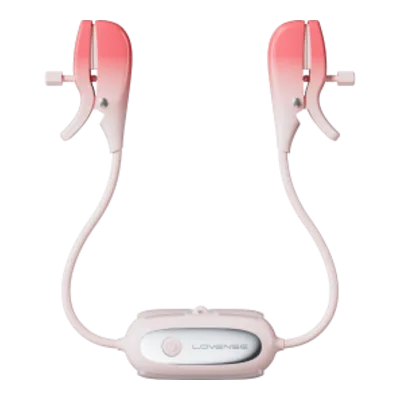
What is the Lovense Gemini for?
The Gemini is a pair of vibrating clamps, for the nipples or other sensitive spots. The pressure is adjusted with screws, and the control unit can be worn as a necklace or clipped to a bra: the attachments are included.
It’s splash-proof (IPX6) and lasts 1.5 to 2 hours. It’s light BDSM play, and it pairs well with another toy.
What Brink drives on a Lovense Gemini
Brink connects directly to the toy over Bluetooth, with no Lovense app or account, and lets the session drive:
- its two motors, one per clamp, each with its own cap
On the toy’s card, in the Toys tab, the “Test” button lets you feel each feature, and each one can be capped or turned off. Brink remembers your settings.
The Gemini really comes into its own with another toy: Brink drives several toys in the same session.
Connect your Lovense Gemini to Brink
- Turn it on near your phone. Charge it first, or plug it into the mains if it’s a machine.
- Close Lovense Remote. If the Lovense app is running, quit it completely: a toy only talks to one app at a time.
- Add it in Brink. Toys tab, “Add a toy”, “Direct Bluetooth”, then “Start scanning”.
- Set it up, and play. Cap or turn off each feature if needed, then start a session from the Play tab.
Your first session with a Lovense Gemini
- Set the pressure. Put the clamps on, then tighten the screws just enough: the vibration does the rest.
- Add another toy. Connect a Lush, a Gush or a Max as well: they all follow the same session.
- Pick a challenge. “Classic” to start with, “Intense” after that.
- Take breaks. Don’t keep the clamps on for too long at a stretch. And each time you tap “Close”, the vibration stops.
Which games to play with a Lovense Gemini?
“Pulse” gives jolts you can clearly feel on the clamps. And “The app decides”, for a session where everything stays secret.
Eight challenges are waiting in the Play tab, from “Gentle” to “Marathon”, and the ending can be left to chance. Every challenge can be tweaked: build-up, breaks, finale, and eight vibration styles, from “Waves” to “Lights”. It’s all described on our games page.
Playing for two with a Lovense Gemini, even long distance
Your partner can lead the session with their finger, remotely, and secretly decide how it ends: a real control game.
They need no account and no app: a simple link opens in their browser, or you play from your conversation in Brink. They run the session right up to the ending, which they pick in secret; you keep “Close”, the pause and the stop. It’s all explained in our long-distance guide.
Frequently asked questions
Can the Gemini be used on its own?
Yes, but it’s mainly made to go with another toy: in Brink, all connected toys follow the same session.
Do I need the Lovense app to use a Lovense Gemini with Brink?
No. Brink connects to it directly over Bluetooth, with no Lovense app or account. You only need a free Brink account.
My Lovense Gemini doesn’t show up in Brink.
Check that it is on and charged (or plugged in), and that no other app is using it: close Lovense Remote completely, then scan again.
Is Brink a Lovense app?
No. Brink is an independent app that works with Lovense toys, but it is neither made nor endorsed by Lovense.
No Lovense Gemini yet?
The current model is the Lovense Gemini. Brink connects to it directly over Bluetooth, with nothing else to install.
Affiliate link: if you buy through it, Brink earns a commission at no extra cost to you. It helps keep the app free.